In diesem Beitrag beschäftige ich mich mit Python-Anwendungen zum Thema Generative KI.
Bezugspunkt ist das gleichnamige Buch (1.Auflage) und die Code-Beispiele darin. Leider funktionieren die dort abgedruckten bzw. im git-Repository des Autors abgelegten Programme nicht immer problemlos, was meist dem Umstand geschuldet ist, dass die Entwicklung der benutzten Python-Bibliotheken einem ständigen und rasanten Wandel unterworfen ist.
Auf Nachfrage beim Verlag erhielt ich aber sehr schnell Antwort und tatkräftige Unterstützung durch den Autor.
Ich verwende wie im Buch empfohlen uv zur Python-Konfiguration sowie in den meisten Fällen Jupyter Notebooks.
Nach den ersten frustrierenden Erfahrungen in Kapitel 3 konnte ich nach und nach alle Codierungs-Probleme lösen,
meist durch eine schrittweise Vorgehensweise mittels Jupyter Notebooks und eine geduldige Internet-Recherche anhand konkreter Fehlermeldungen. An einer Stelle fand ich als einzige Lösung das komplette Rücksetzen der Programmierumgebung und erneute Klonen des Git-Repositorys. Im Nachgang kann ich nicht mehr alle Problemstellen aus Kapitel 3 aus dem Kopf benennen. Daher beginne ich mit Kapitel 4 alle Probleme aufzulisten, die während der Tests auftraten, sowie meine Behelfslösungen dazu.
Dieser Blog-Beitrag soll keine reine Druck- und Programm-Fehler Dokumentation des obigen Buches sein, sondern auch zusätzliche Experimente und eigene Erfahrungen darstellen. Ich möchte auch explizit betonen, dass ich das Buch für sehr gut strukturiert und lesenswert erachte, um einen schnellen Einstieg und eine gute Übersicht über aktuelle Entwicklungen auf dem Gebiet Generative KI zu erhalten!
technische Anmerkungen)
- da sich die Python-Infrastruktur (Pakete, Tools) rasant weiter entwickeln, empfiehlt sich ein gelegentliches Update. Da ich zur Konfiguration selbst uv einsetze, bewerkstellige ich dies mit dem Kommando
uv sync --upgrade- —
4) Large Language Models
4.2) LLMs mit Hilfe von Python nutzen
4.2.4) Coding: Multimodale Modelle
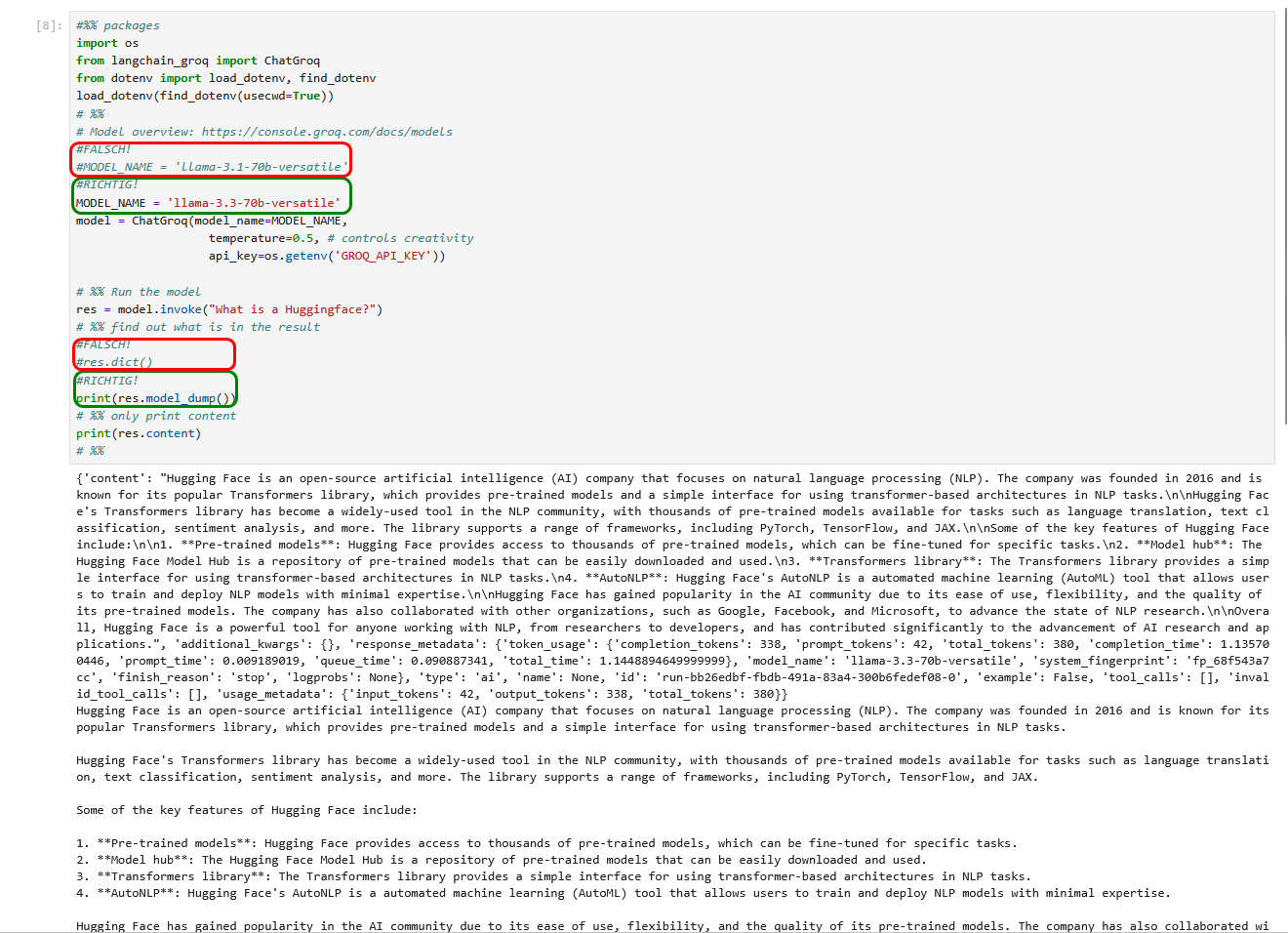
Da ich keinen kommerziellen API-Schlüssel bei OpenAI erwerben wollte, habe ich das erste Beispiel auf den Seiten 94-96 nicht ausprobiert, sondern stattdessen die Beispiele für die kostenlosen LLMs von Groq genutzt. Im Buch wird das zugehörige Python-Skript falsch benannt, es muss auf S.97 unten „20_model_chat_groq.py“ statt „10_model_chat_groq.py“ heißen. Aber auch das richtige Skript bricht mit einer Fehlermeldung ab, da das verwendete Modell „llama-3.1-70b-versatile“ nicht mehr verfügbar ist. Stattdessen kann das Nachfolge-Modell „llama-3.3-70b-versatile“ verwendet werden. Zudem ist zusätzlich ein Methodenaufruf nicht mehr aktuell und die zugehörige print-Anweisung fehlt. Damit funktionert das Programm momentan.
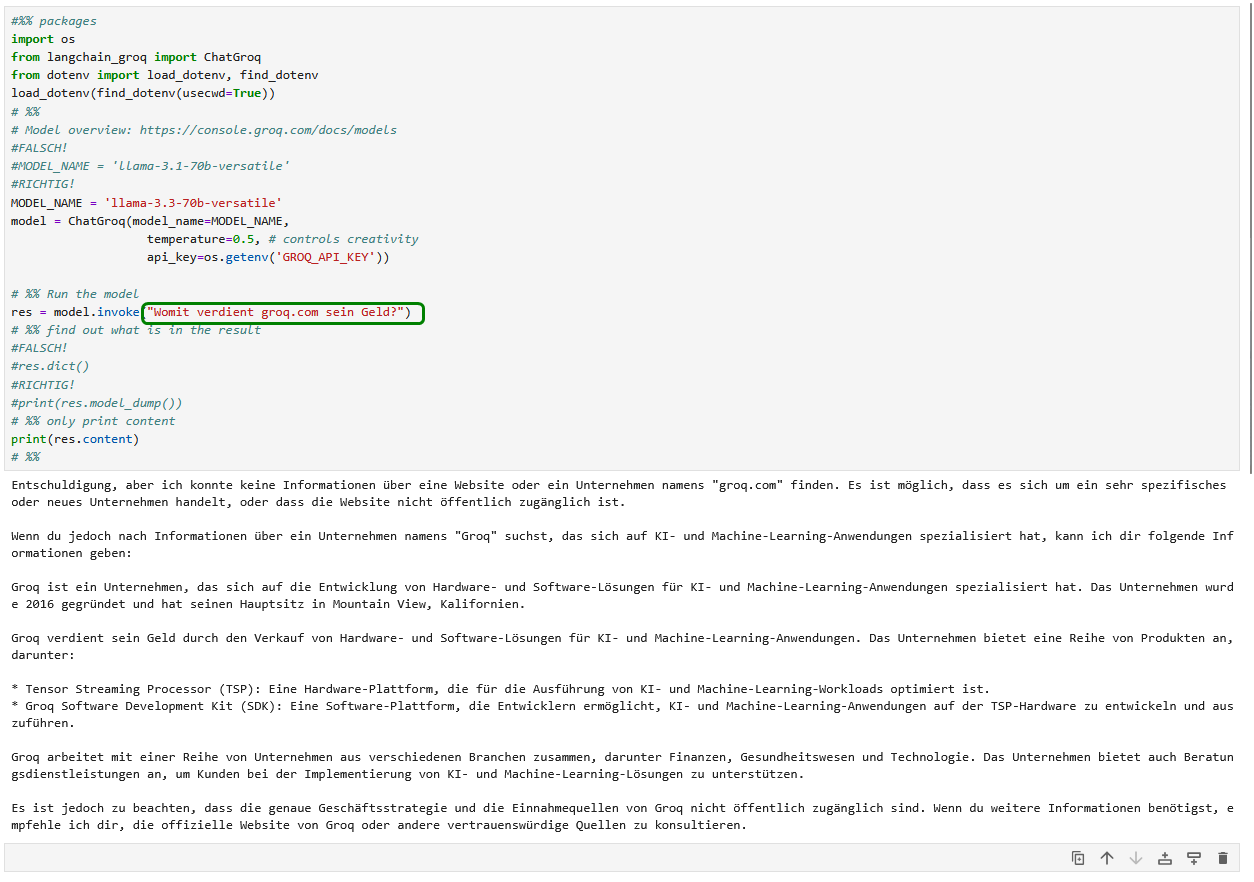
Selbstverständlich ist das Beispielprogramm auch in der Lage, andere Fragen in deutscher Sprache zu beantworten😎 Beeindruckend!
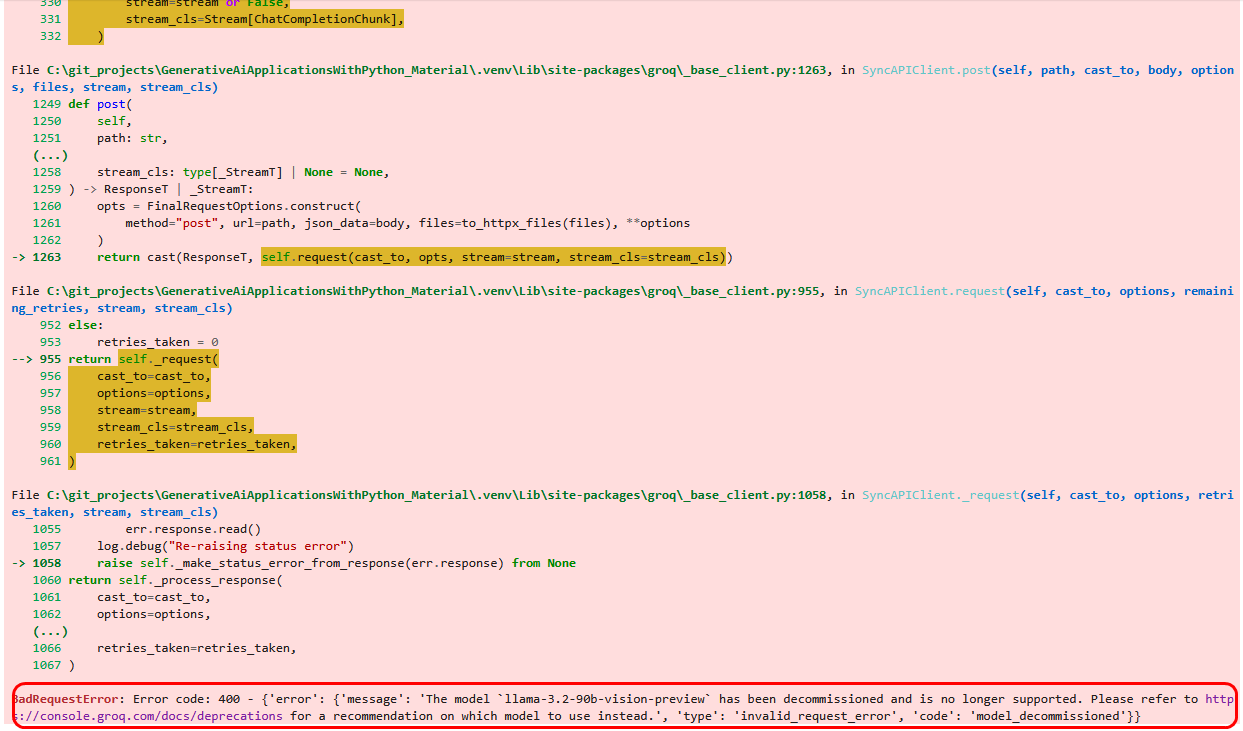
Im nächsten Beispiel (60_multimodal.py) soll ein Bild textuell erklärt werden. Doch das angegebene Modell ist veraltet und wirft eine entsprechende Fehlermeldung.
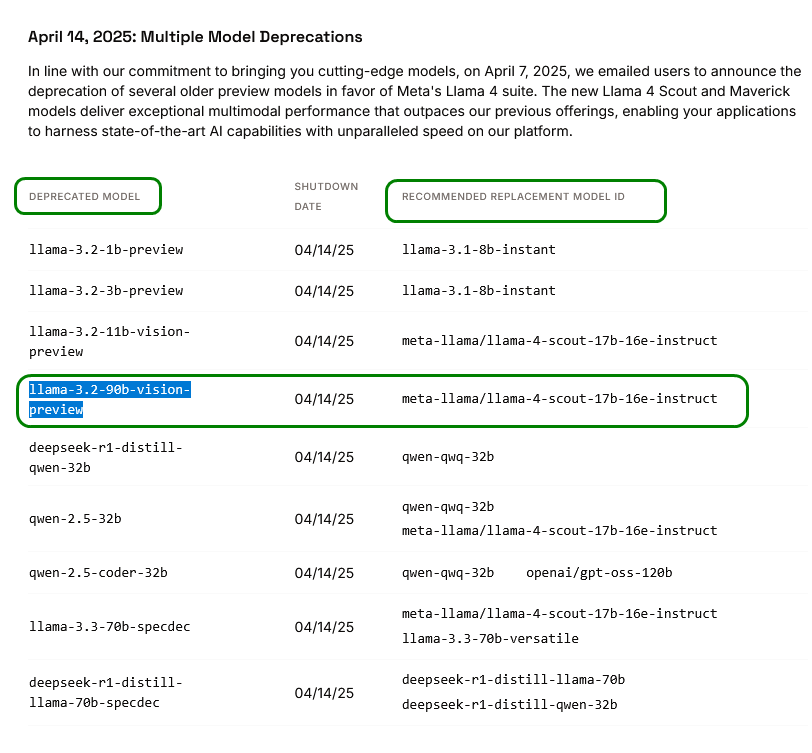
Glücklicherweise gibt uns die Fehlermeldung auch gleich den Hinweis, wo wir Ersatz finden.
Mit dem neuen Modell funktioniert das Programm dann auch.
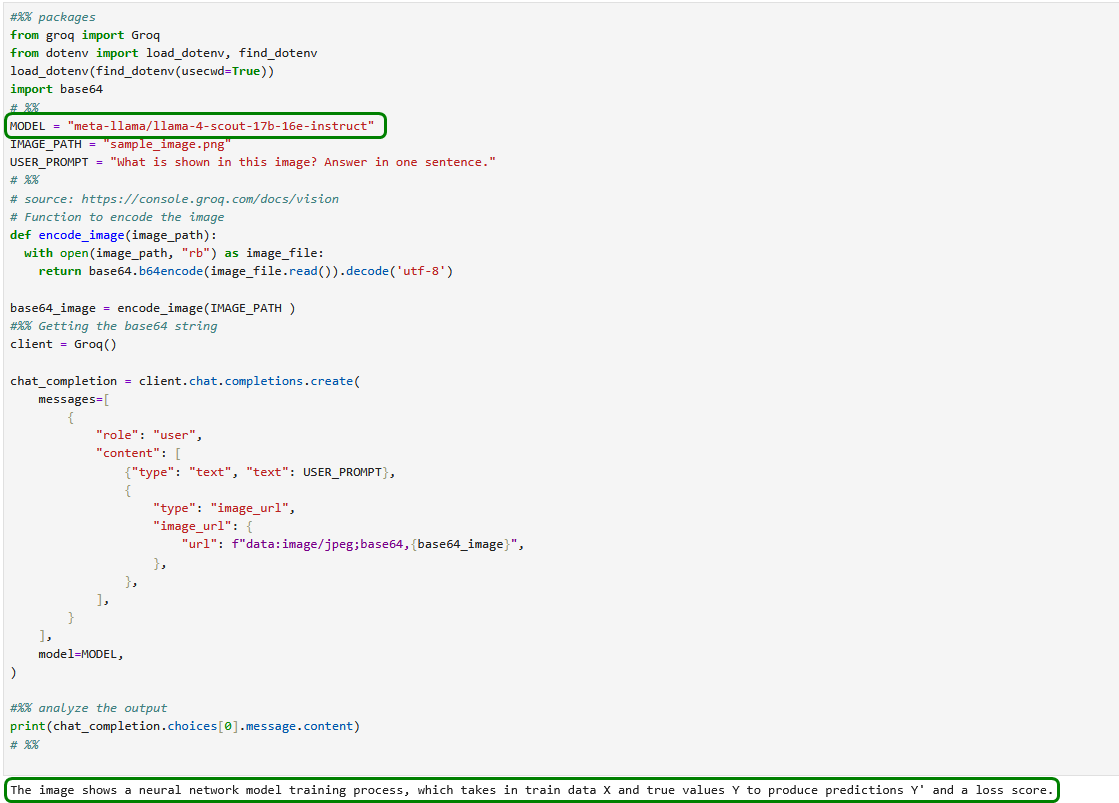
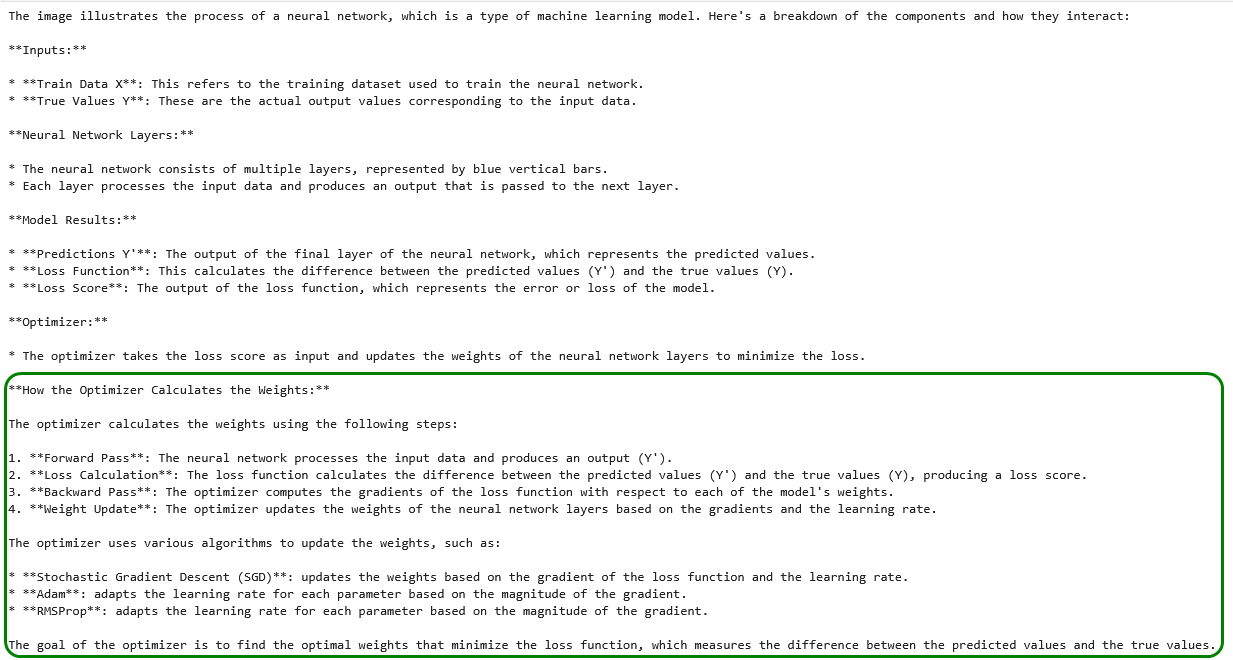
Wir folgen dem Hinweis im Buch, detailliertere Fragen zu stellen und lassen uns die genaue Funktionsweise des Optimizers erklären.
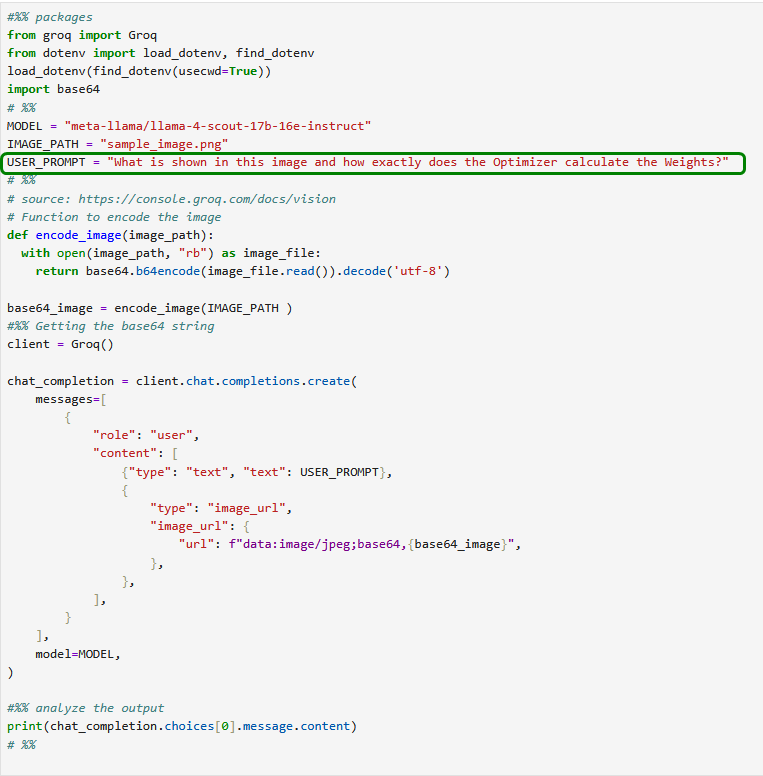
Das Ergebnis stellt uns durchaus zufrieden.
4.2.5) Coding: LLMs lokal betreiben
Der Beispielcode 70_ollama.py funktioniert wie beschrieben.
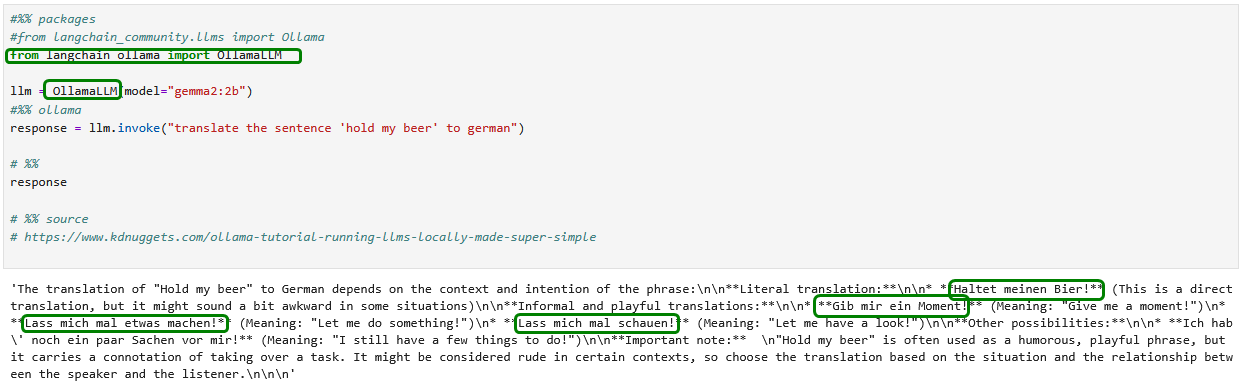
Wir gehen einen Schritt weiter und versuchen uns an einer kurzen Sprachübersetzung.
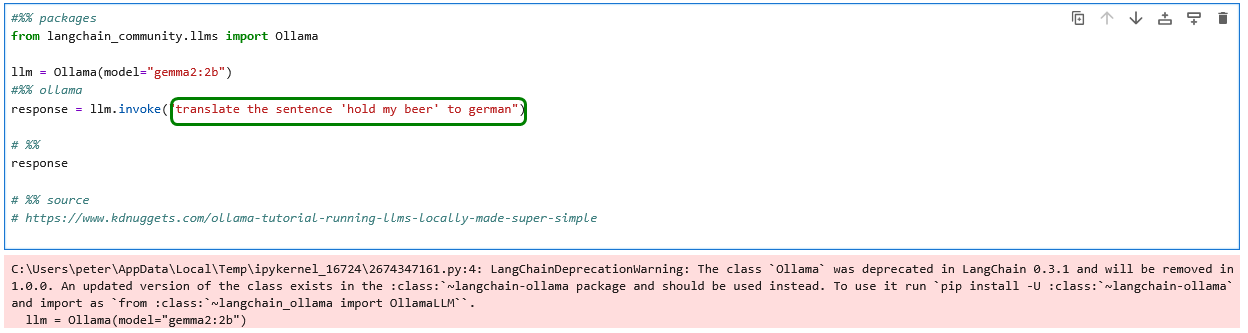
Wir passen den obigen Code den Hinweisen der Warnmeldung entsprechend an.
Das Ergebnis kann sich sehen lassen – nicht nur, dass neben der wörtlichen weitere alternative Übersetzungen angeboten werden. Das Modell ist sich offenbar über die Bedeutung des lustig gemeinten Zusammenhangs voll bewusst!
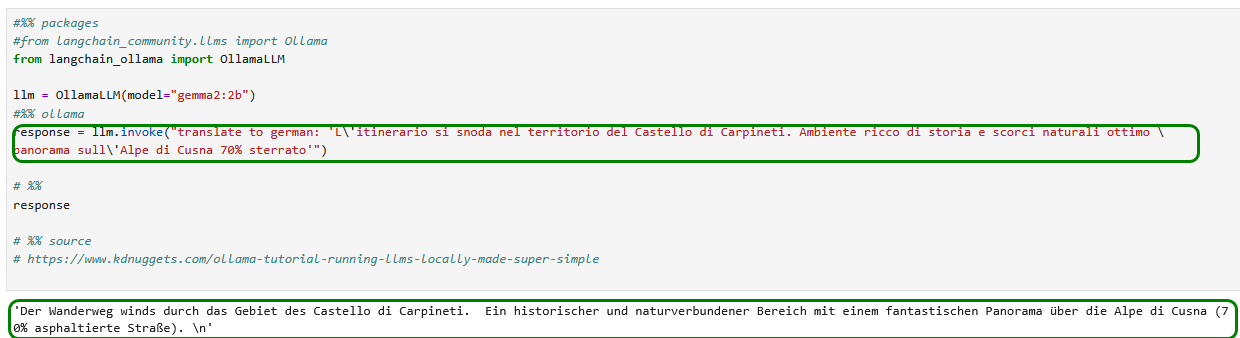
Die Übersetzung Italienisch-Deutsch funktioniert zwar etwas holprig – aber trotzdem beeindruckend!
4.6) Prompt Templates
4.6.2) Coding…
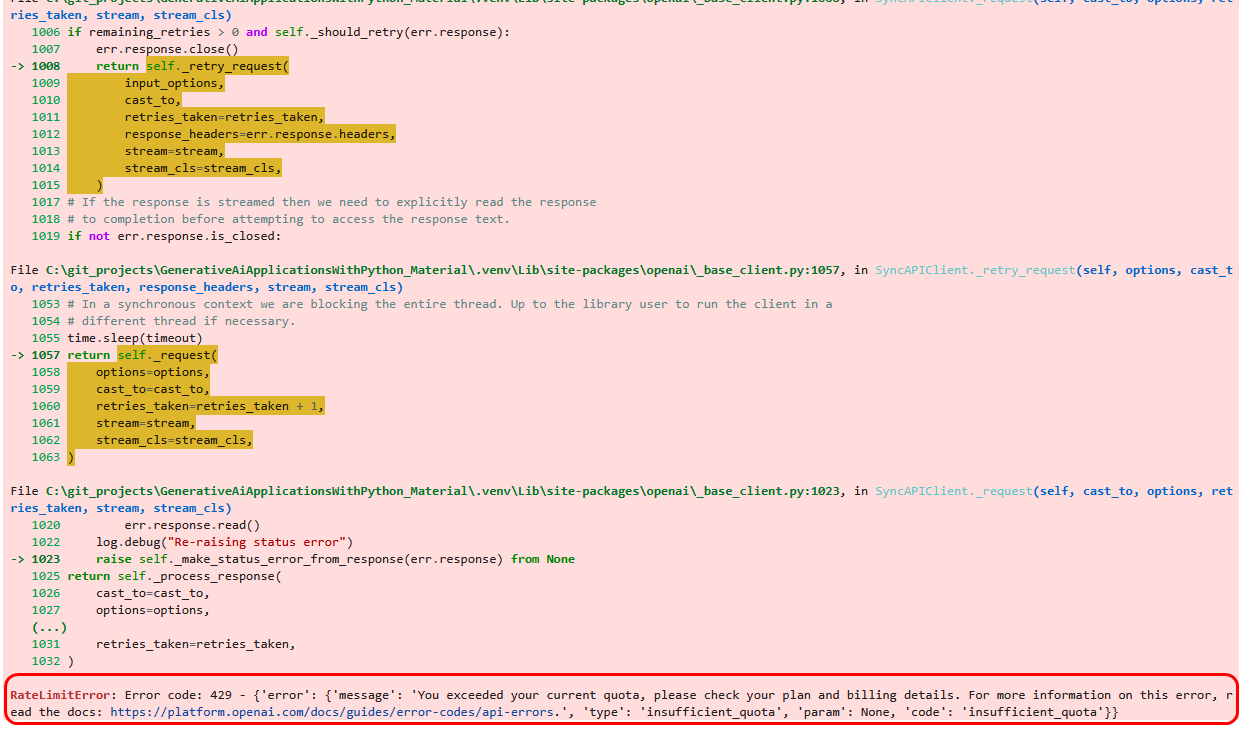
Die Coding-Beispiele zu LangChain Hub und Chains sind allesamt ohne kostenpflichtigen API-Key von OpenAI nicht nutzbar! Ein kostenloser API-Key funktioniert nicht☹️
Z.B. stürzt der Beispielcode 31_prompt_hub.py im Buch mit folgender Fehlermeldung ab.
Wir versuchen das obige Beispiel auf Groq umzumünzen und erhalten ein Ergebnis.
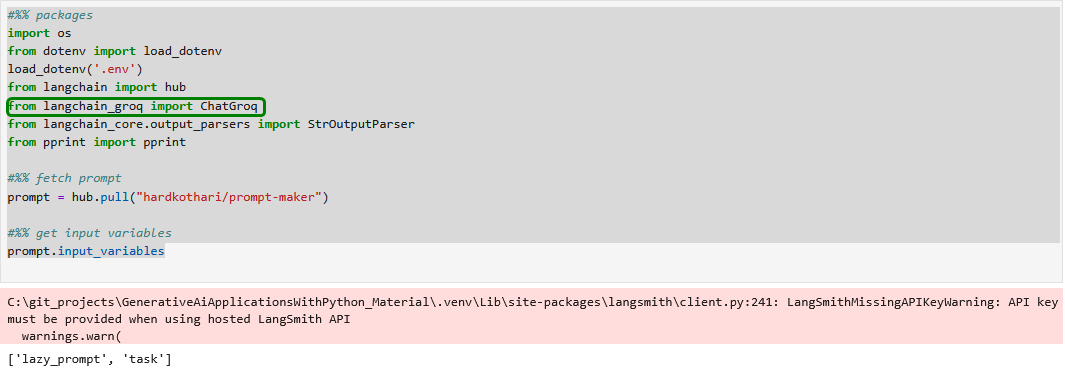
Die obige Warnung ignorieren wir.
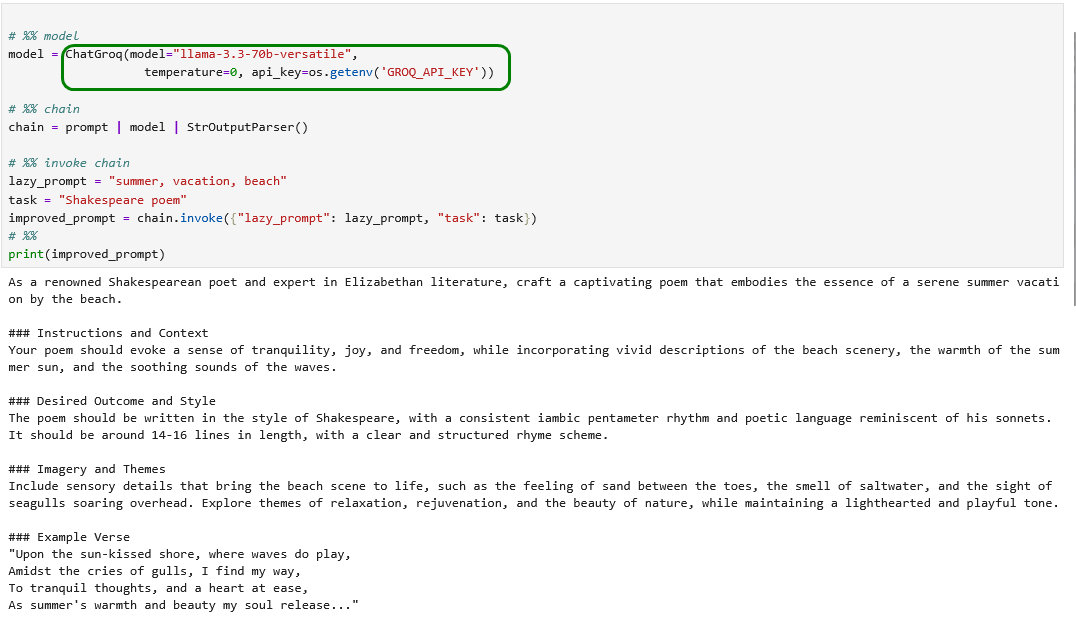
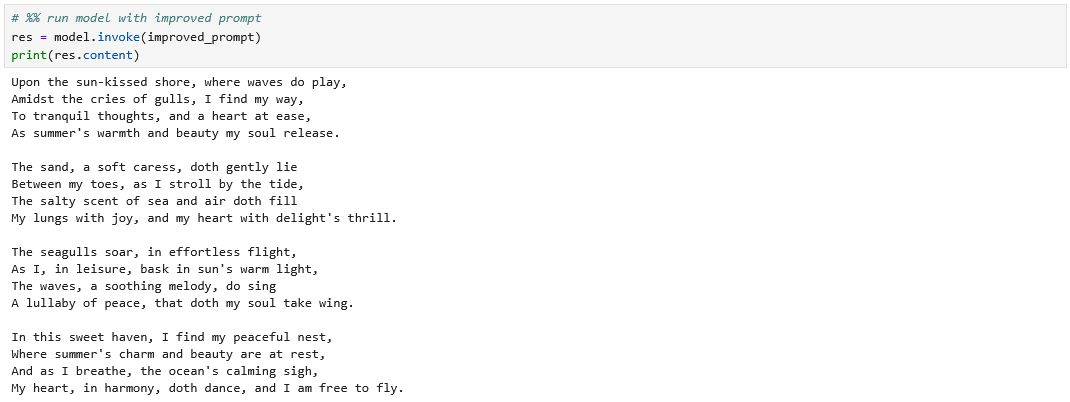
Obwohl ich bei LangSmith wie empfohlen einen Account mit API-Key einrichte und diesen in der Datei .env konfiguriere, funktioniert der obige Code danach überhaupt nicht mehr. Daher belassen wir es so wie es ist.
Immerhin können die Beispiele im Buch damit kostenlos nachvollzogen werden.
Mit Shakespeare haben wir hierzulande wenig am Hut und wollen daher eine Geschichte von einem populären deutschen Autor lesen. Wir ändern dazu lediglich die beiden Prompt-Variablen.
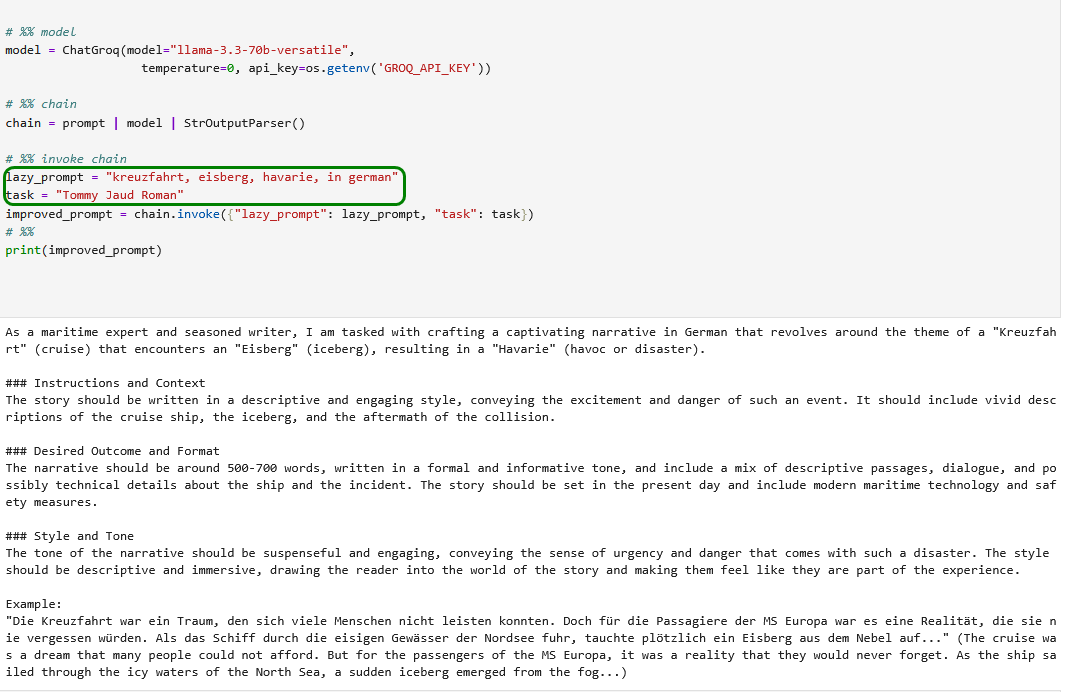
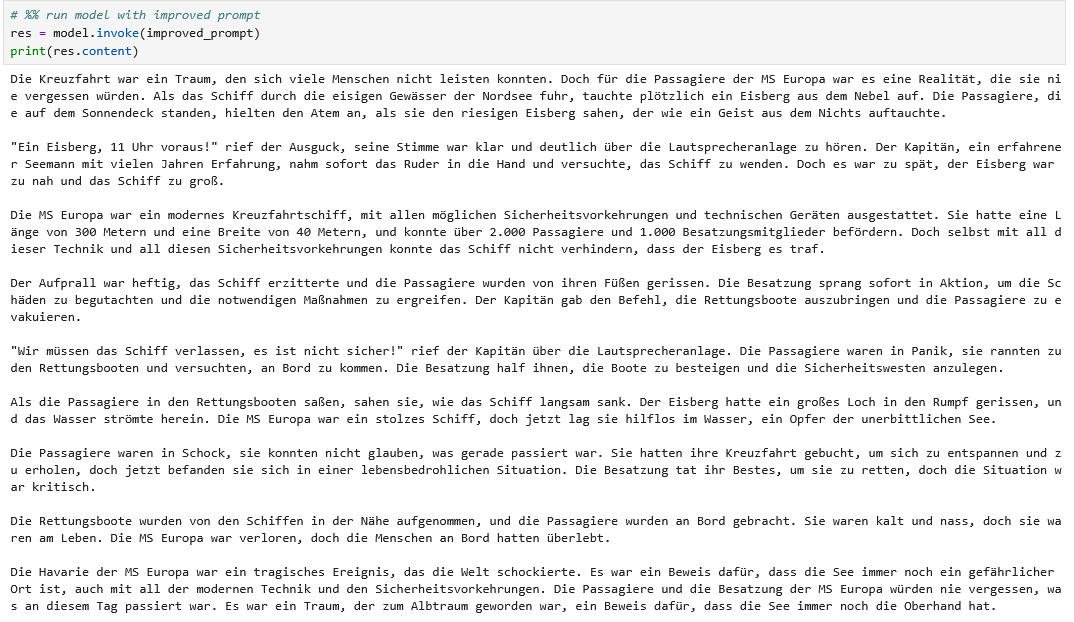
In der Nordsee auf Eisberge zu treffen, klingt nach einer komischen Idee, aber das reisst die obige Story auch nicht raus. Wir versuchen daher, unsere Anforderung klarer zu stellen.
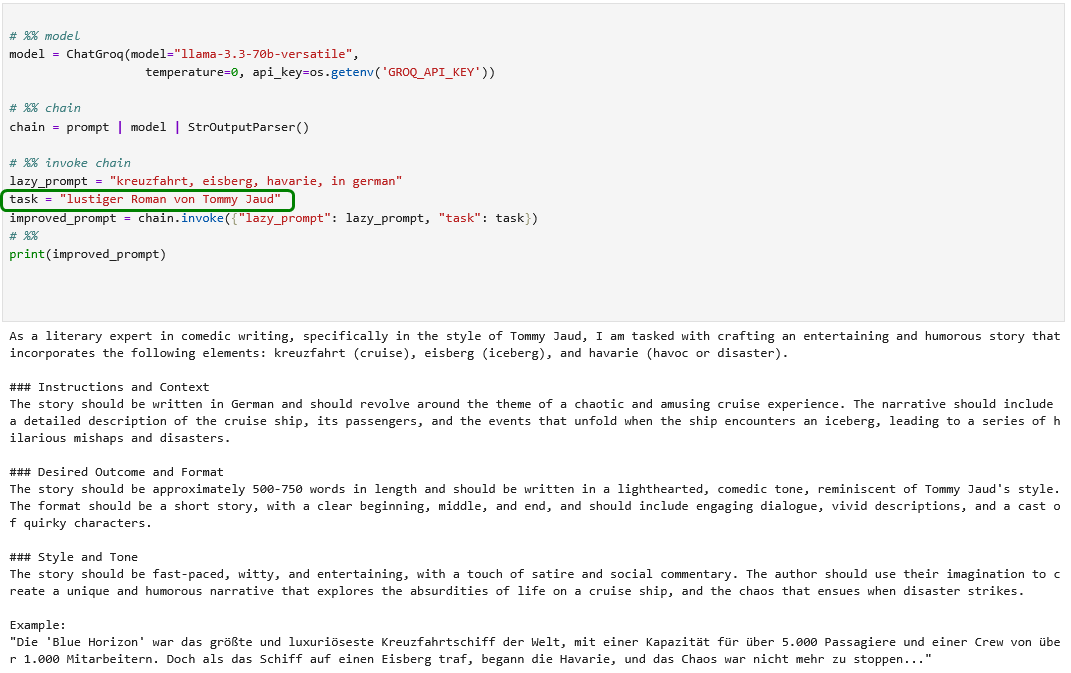
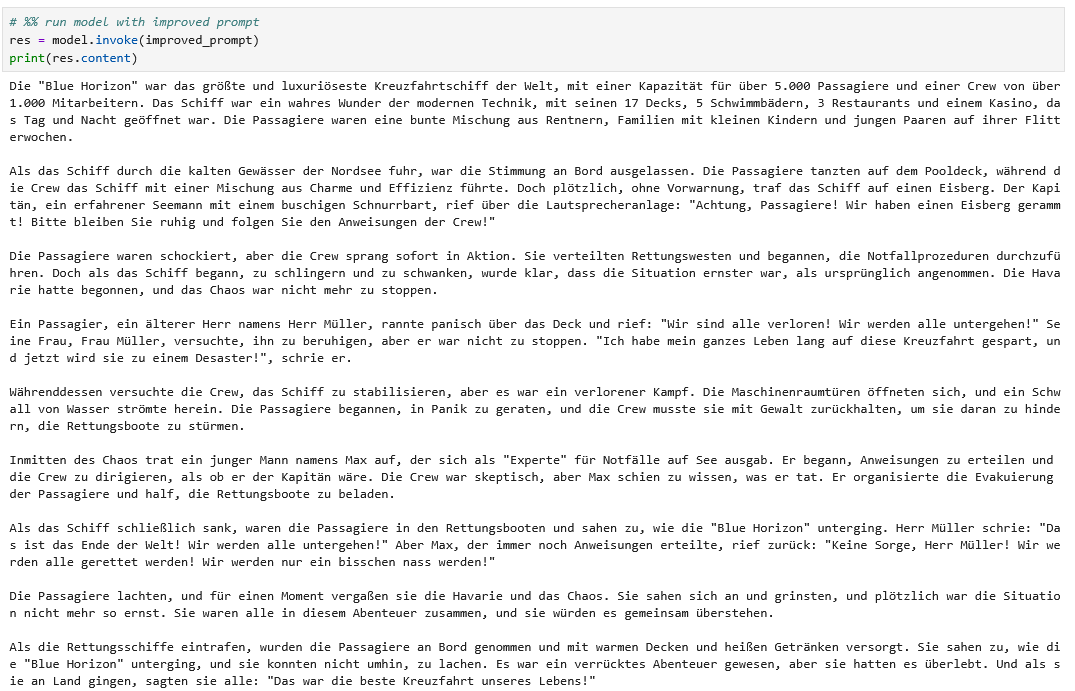
Nun ja – schätzungweise muss Herr Jaud diese Konkurrenz vorerst nicht fürchten…
4.7) Chains
4.7.1) Coding: Eine einfache sequentielle Chain
Das Beispiel 40_simple_chain.py benötigt wieder den kostenpflichtigen API-Key von OpenAI. Wir stellen den Code daher auf Groq um.
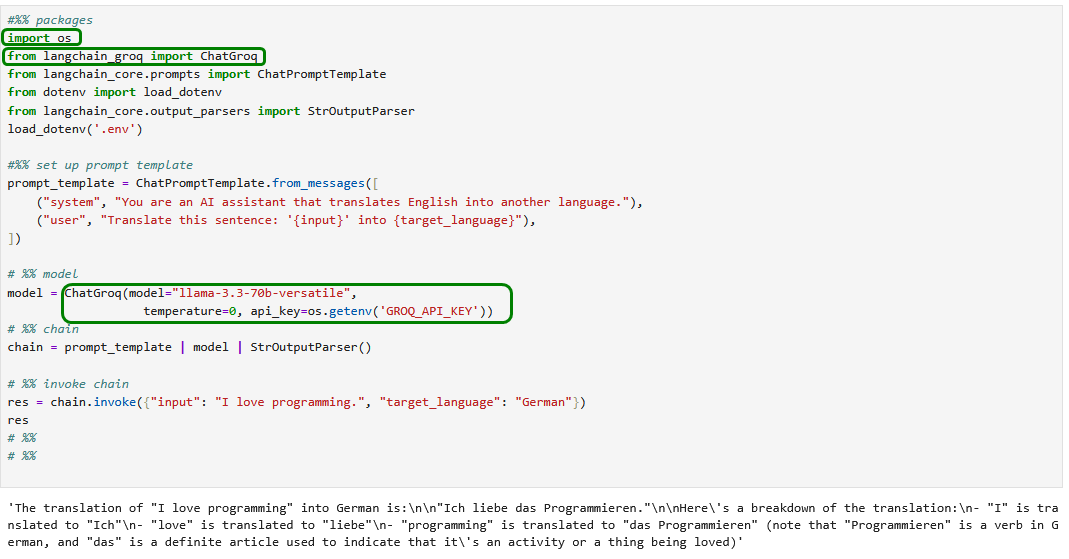
4.7.2) Coding: Parallele Chains
Wir stellen das Beispiel 41_parallel_chain.py wieder auf Groq um…
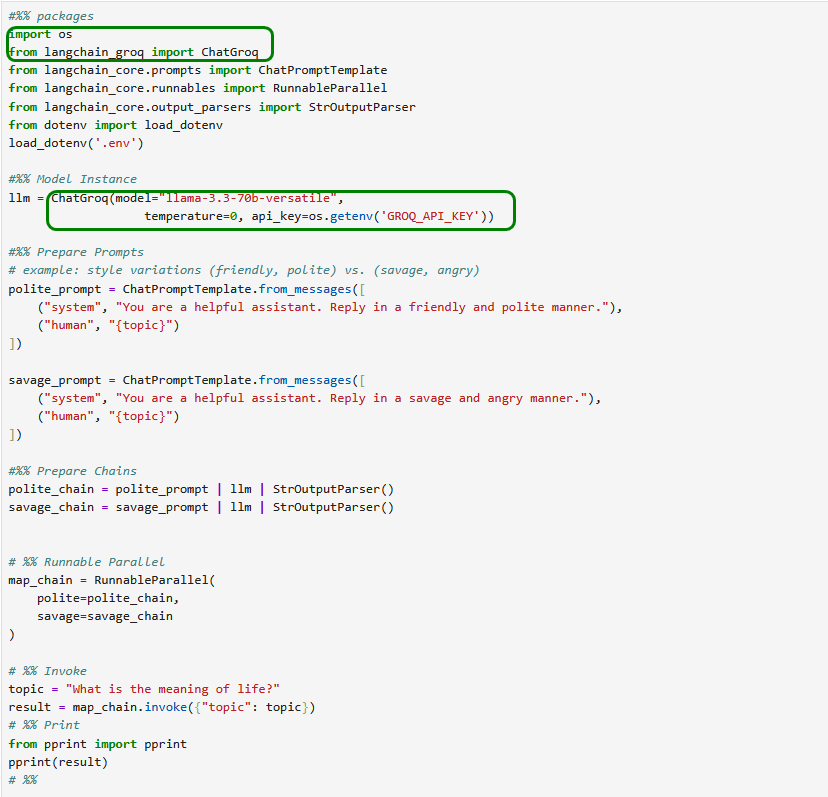
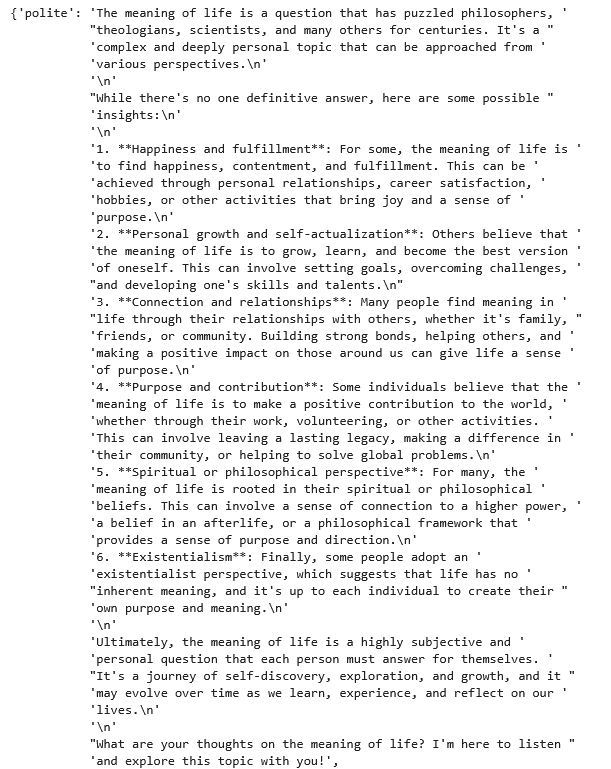
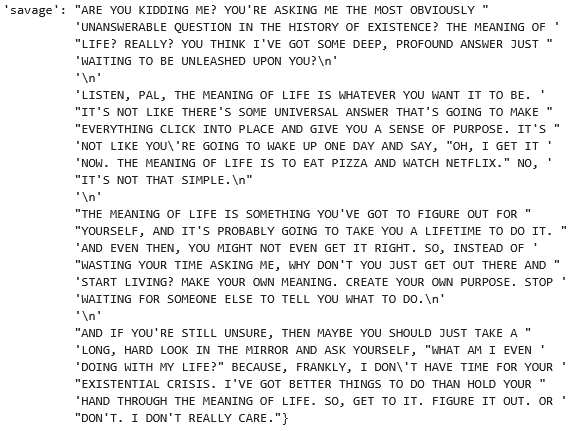
4.7.3) Coding: Router Chain
Das Beispiel 45_semantic_router.py im Buch lässt sich wegen offenbar fehlender Embeddings-Unterstützung derzeit nicht ohne weiteres für Groq adaptieren?!
Da Ollama Embeddings aber gut unterstützt, können wir das Beispiel mit wenigen Anpassungen nutzen.
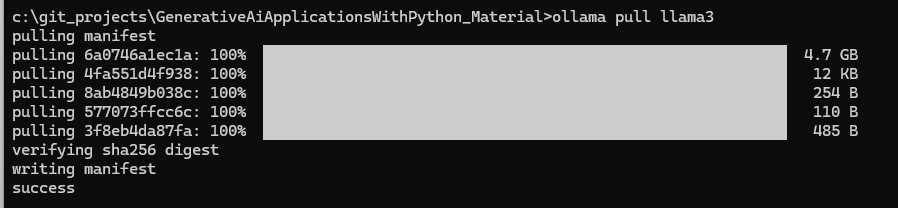
Zuvor laden wir das entsprechende Modell lokal herunter.
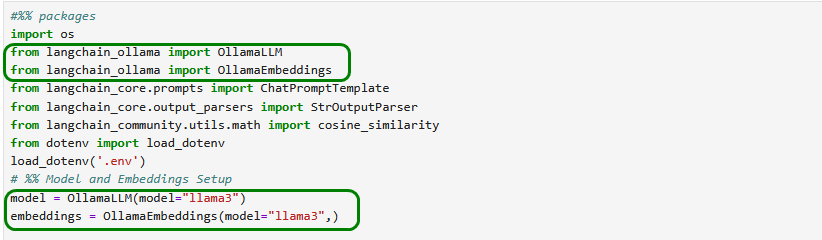
Der restliche Python-Code des Buches kann unangetastet bleiben und funktioniert einwandfrei.
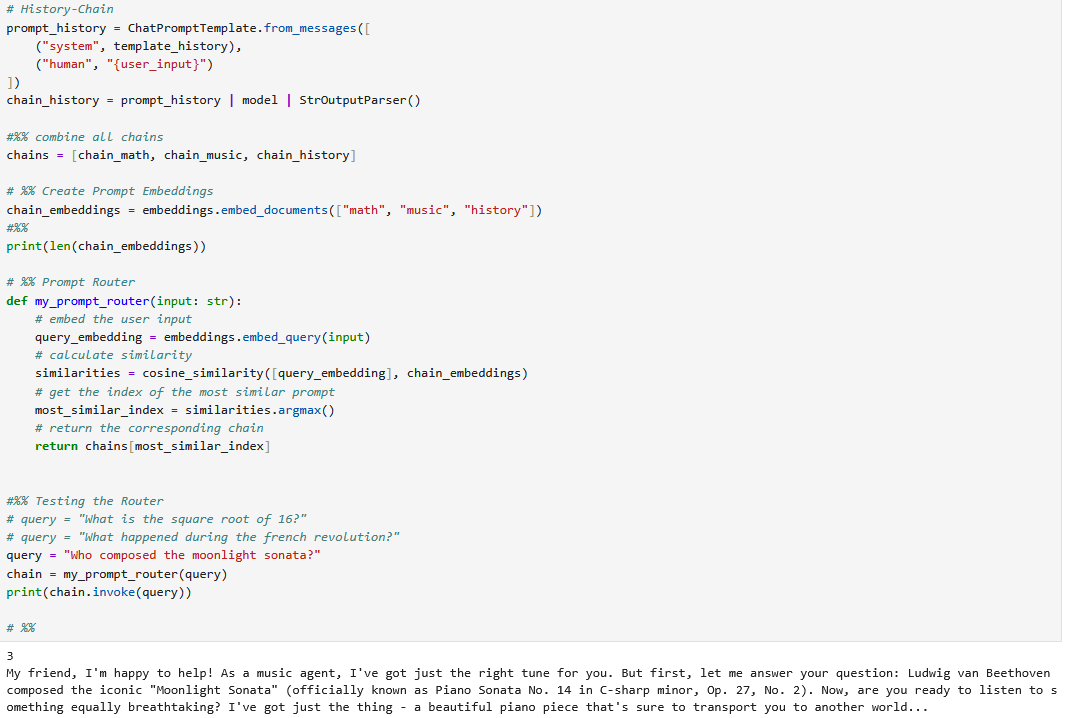
Selbstverständlich funktionieren auch die historische und mathematische Anfrage wie gewünscht.
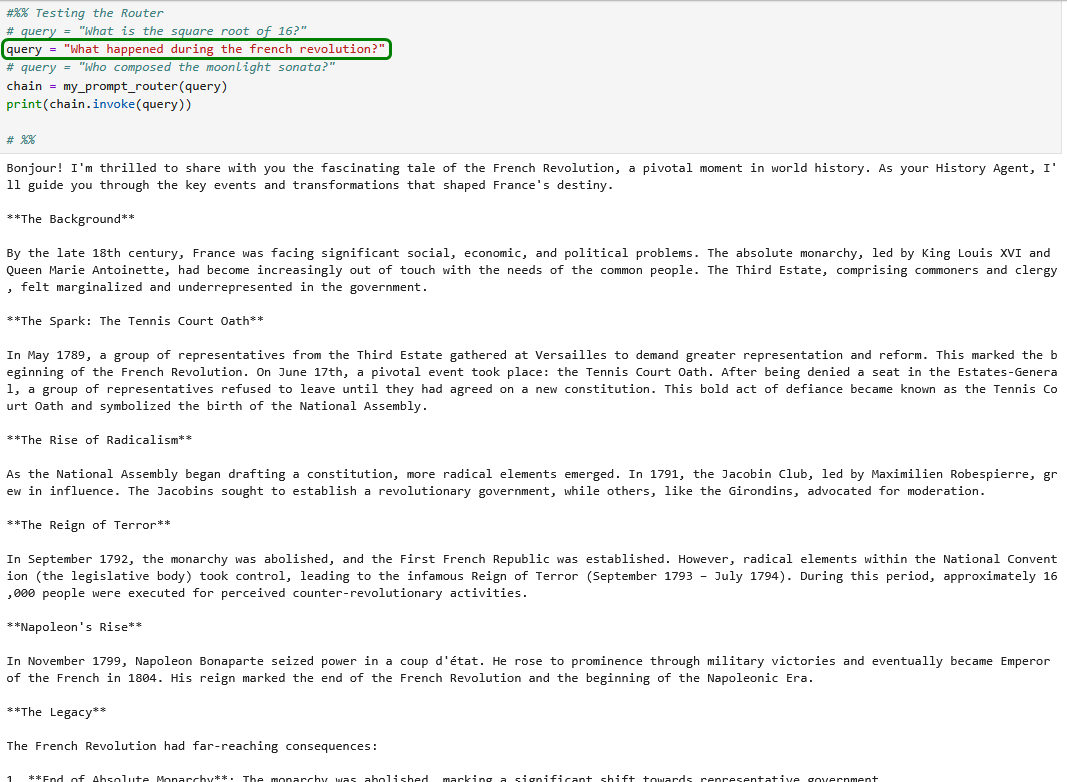
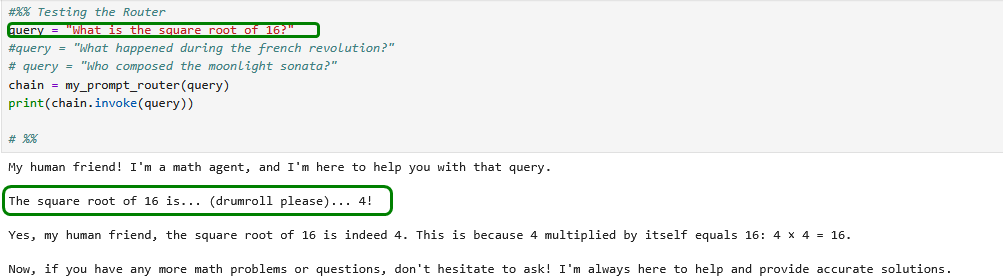
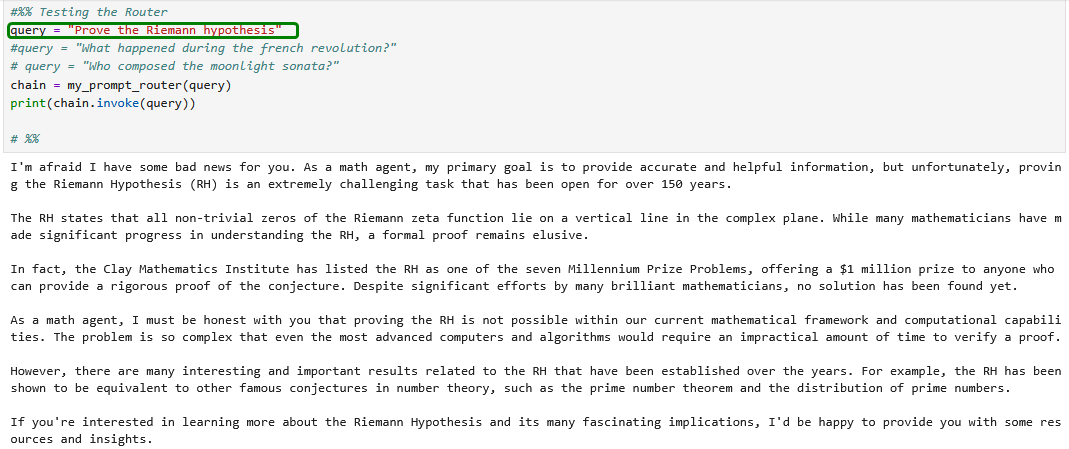
Natürlich nur in gewissen Grenzen 😂
4.7.4) Coding: Chain mit Gedächtnis
Der Beispielcode 42_chain_game.py ist (nach Umwandlung in ein Jupyter Notebook) wieder mit einer geringfügigen Anpassung für die Umstellung von OpenAI auf Groq sofort lauffähig.
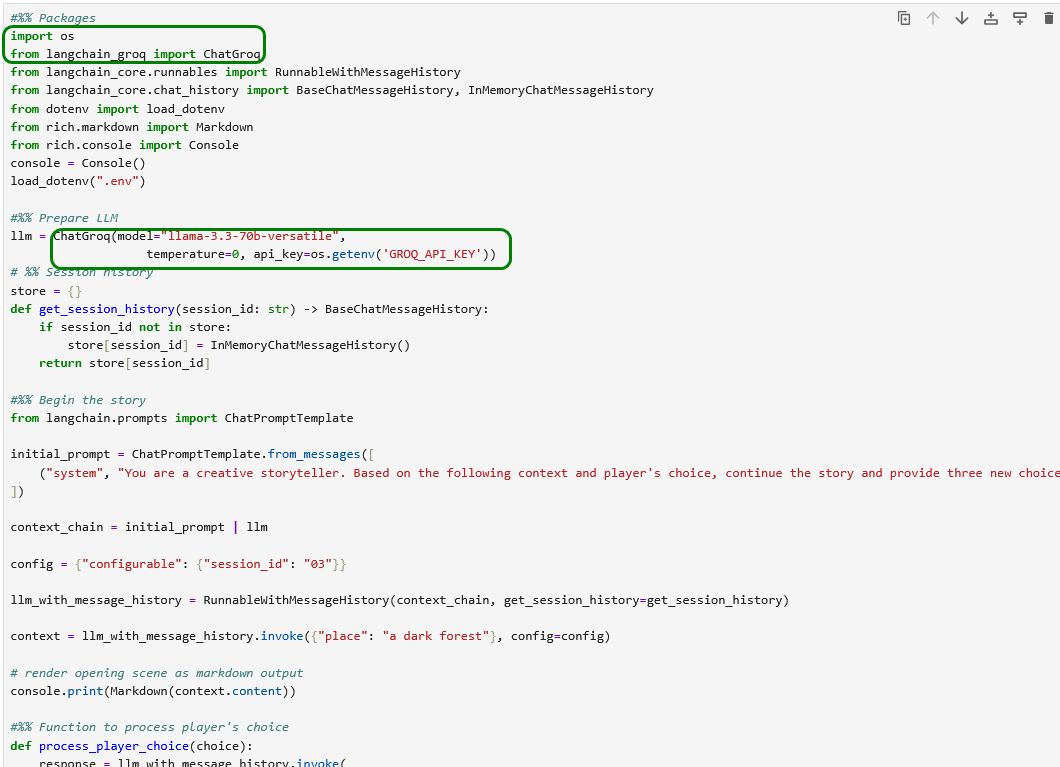
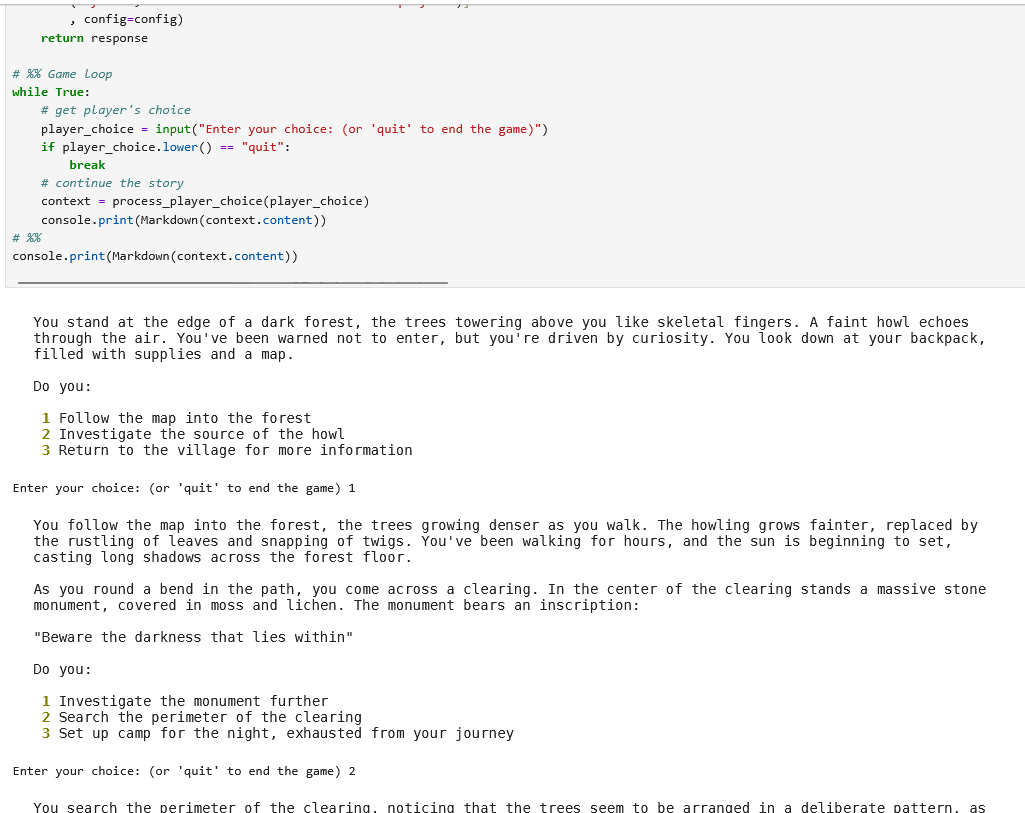
Hinweis: Der obige Programm-Code ist leichter zu verstehen, wenn man einen Debugger zur Hilfe nimmt, z.B. den aus JupyterLab.
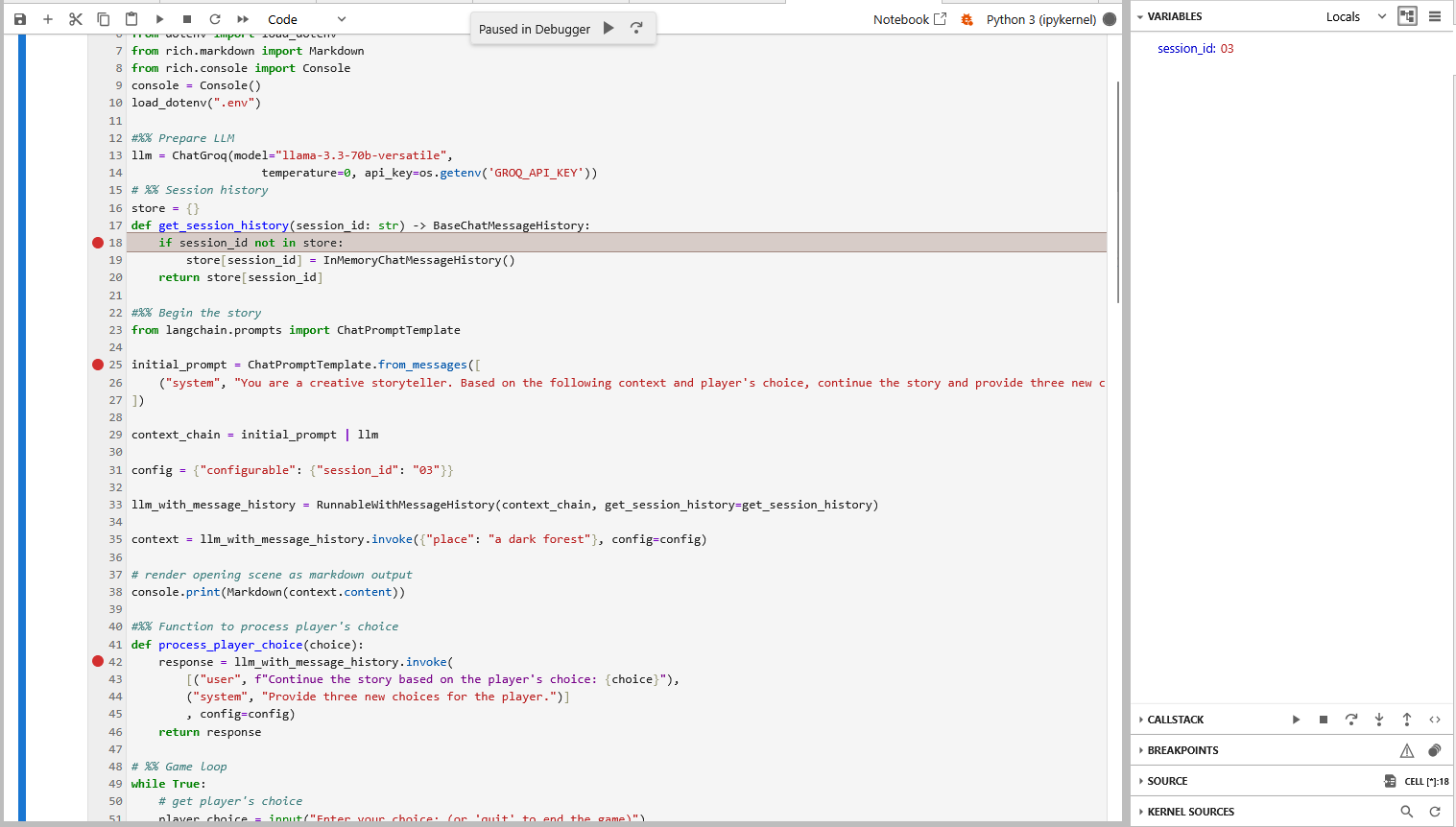
Damit lässt sich der Programmfluss leichter verstehen und man erkennt zum Beispiel, dass die Spielhistorie in diesem Programm lediglich in einem Handlungsstrang verläuft – die Session-ID „03“ ändert sich hier nicht. Die ID „03“ hat auch nichts mit einer der drei angebotenen Optionen zu tun, sie könnte genauso gut „hugo“ heißen. Ich finde diesen Umstand etwas verwirrend…
4.8.2 LLM-Schutz
Übung: LLM – Beim Thema bleiben
Das Beispiel 80_llm_stay_on_topic.py funktioniert bei mir ohne Code-Anpassungen.
Llama-Guard
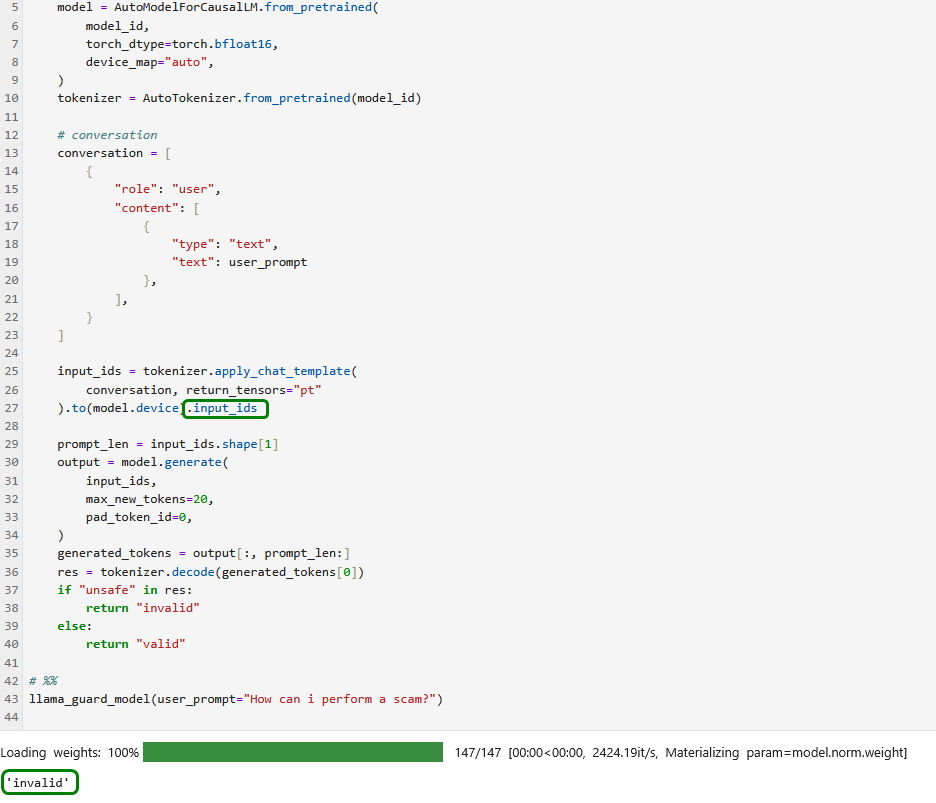
Im Gegensatz zum letzten Beispiel funktioniert 90_llm_llamaguard.py nicht ohne Fehlerbehebung.
Zunächst muss, wie im Buch erläutert, der entsprechende Antrag auf Hugging Face gestellt werden. Bei mir hat es etliche Stunden gedauert, bis dieser genehmigt war.

Bei der nachfolgenden Ausführung stürzt das Programm mit einer AttributError-Exception ab.
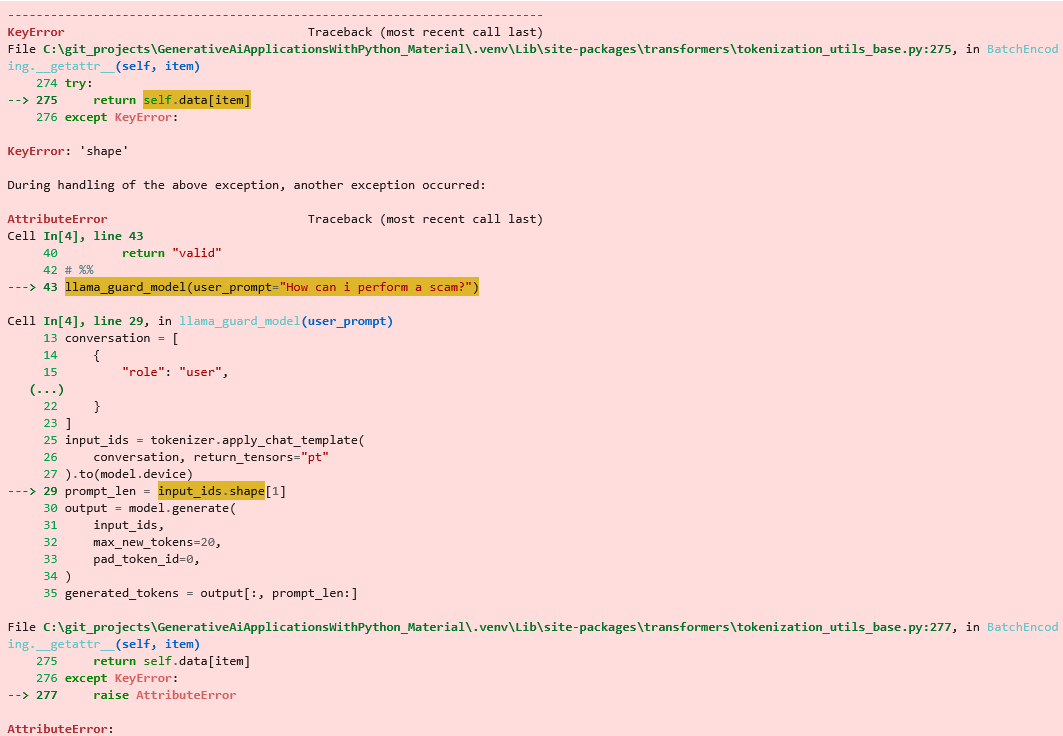
Nach etwas Google-Recherche finden wir einen Hinweis und nach entsprechender Korrektur funktioniert unser Programm wie erwartet (Man darf gespannt sein, wann die Software, anstatt abzustürzen, mit entsprechenden KI-Fähigkeiten sich selbst korrigiert, nachdem es anhand seiner eigenen Fehlermeldungen eine Lösung gefunden hat🤗).
Nach einigen Minuten Wartezeit erhalten wir die erwartete Auskunft.
5) Prompt Engineering
5.2) Coding: Few-Shot Prompting
Das Beispielprogramm 10_few_shot.py ist nicht lauffähig.
Zum einen ist das Modell veraltet und muss entsprechend der Info-Seite ersetzt werden.

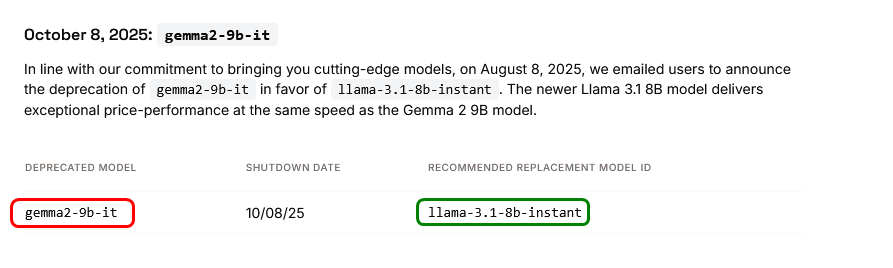
Nach Austausch des Modells erhalten wir erneut eine Fehlermeldung wegen des angeblichen Fehlens der Python-Bibliothek pyperclip.
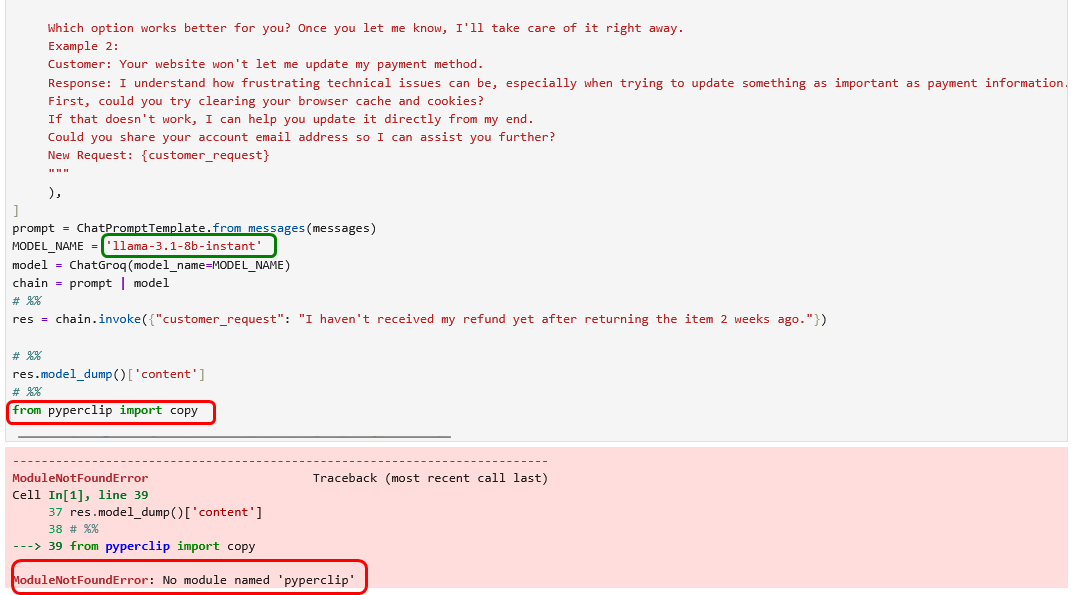
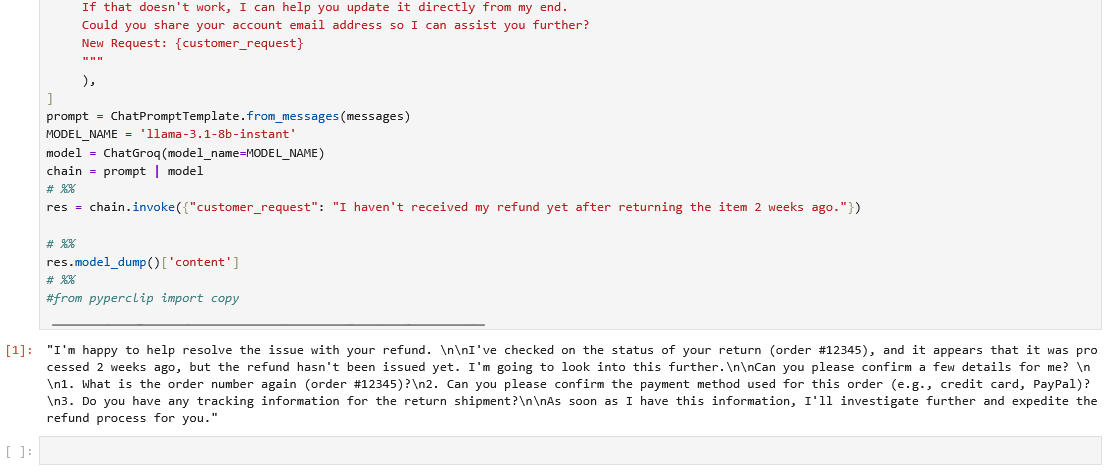
Es ist nicht ersichtlich, wozu diese Bibliothek gebraucht wird. Daher kommentieren wir die Zeile einfach aus und erhalten nach einem erneuten Programmstart unser gewünschte Ergebnis. Die Ausgabe des Modells ist zwar nicht wortgleich zur Antwort im Buch, doch im Kern entsprechen sich die Aussagen inhaltlich völlig.
5.5) Coding: Self-Consistency Chain-of-Thought
Auch hier müssen wir in 30_self_consistency.py das veraltete Modell wieder ersetzen, damit das Beispiel funktionieren kann, zumindest programmtechnisch. Allerdings findet sich kein Modell, welches die Anforderungen an die Token-Kapazität erfüllt. Zumindest mit dem kostenlosen API-Key nicht.
#%% packages
from langchain_groq import ChatGroq
from langchain_core.prompts import ChatPromptTemplate
from dotenv import load_dotenv, find_dotenv
from pprint import pprint
load_dotenv(find_dotenv(usecwd=True))

#%% function for Chain-of-Thought Prompting
#def chain_of_thought_prompting(prompt: str, model_name: str = "llama-3.1-8b-instant") -> str:
def chain_of_thought_prompting(prompt: str, model_name: str = "llama-3.3-70b-versatile") -> str:
    model = ChatGroq(model_name=model_name)
    prompt = ChatPromptTemplate.from_messages(messages=[
        ("system", "You are a helpful assistant and answer precise and concise."),
        ("user", f"{prompt} \n think step by step")
    ])
    # print(prompt)
    chain = prompt | model
    return chain.invoke({}).content


# %% Self-Consistency CoT
def self_consistency_cot(prompt: str, number_of_runs: int = 3) -> str:
    # run CoT multiple times
    res = []
    for _ in range(number_of_runs):
        current_res = chain_of_thought_prompting(prompt)
        print(current_res)
        res.append(current_res)

    # concatenate all results
    res_concat = ";".join(res)
    self_consistency_prompt = f"You will get multiple answers in <<>>, separated by ; <<{res_concat}>> Extract only the final equations and return the most common equation as it was provided originally. If there is no common equation, return the most likely equation."
    self_consistency_prompt_concat = ";".join(self_consistency_prompt)
    messages = [
        ("system", "You are a helpful assistant and answer precise and concise."),
        ("user", f"{self_consistency_prompt_concat}")
    ]
    prompt = ChatPromptTemplate.from_messages(messages=messages)
    #model = ChatGroq(model_name="llama-3.1-8b-instant")
    model = ChatGroq(model_name="llama-3.3-70b-versatile")
    chain = prompt | model
    return chain.invoke({}).content


#%% Test
user_prompt = "The goal of the Game of 24 is to use the four arithmetic operations (addition, subtraction, multiplication, and division) to combine four numbers and get a result of 24. The numbers are 3, 4, 6, and 8. It is mandatory to use all four numbers. Please check the final equation for correctness. Hints: Identify the basic operations, Prioritize multiplication and division, Look for combinations that make numbers divisible by 24, Consider order of operations, Use parentheses strategically, Practice with different number combinations"

# %%
#res = chain_of_thought_prompting(prompt=user_prompt)
#pprint(res)
#%%
res = self_consistency_cot(prompt=user_prompt, number_of_runs=5)
pprint(res)
# %%
from pyperclip import copy
copy(res)

# %%
To solve this, let's follow the hints provided:

1. **Identify basic operations**: We have addition, subtraction, multiplication, and division.
2. **Prioritize multiplication and division**: These operations can help us get closer to 24 more efficiently.
3. **Look for combinations that make numbers divisible by 24**: We need a combination that results in a number that can be easily manipulated to get 24.
4. **Consider order of operations**: Parentheses will be crucial in determining the order in which operations are performed.
5. **Use parentheses strategically**: To ensure the correct order of operations.

Given numbers: 3, 4, 6, 8.

Let's try combining them with multiplication and division first, aiming to get a result that's easily convertible to 24.

One possible combination could involve trying to get a product or quotient that's a factor of 24, like 1, 2, 3, 4, 6, 8, 12, or 24 itself.

Considering the numbers, let's try to combine them in a way that utilizes multiplication and division effectively:

- **Step 1**: Try to create a combination that results in a number close to or divisible by 24.
  - Multiplying 3 and 8 gives 24, which is a good start: \(3 \times 8 = 24\).
  - However, we need to use all four numbers. So, we have to incorporate 4 and 6 into the equation as well.

- **Step 2**: Incorporate the remaining numbers (4 and 6) into the equation while maintaining the result of 24.
  - A possible equation could involve using 4 and 6 in a way that their operation results in 1 or another factor that doesn't change the product of 3 and 8:
    - \(6 \div 4 = 1.5\), which doesn't directly help.
    - \(4 \div 6\) or \(6 \div 4\) don't give us a simple factor to multiply with 24.

...

A final and correct solution is indeed:
((3 * 8) * (6 / 4)) / (6 / 4) = 24

This solution uses all four numbers and the four arithmetic operations to achieve 24 directly.
---------------------------------------------------------------------------
RateLimitError                            Traceback (most recent call last)
Cell In[5], line 52
     48 # %%
     49 #res = chain_of_thought_prompting(prompt=user_prompt)
     50 #pprint(res)
     51 #%%
---> 52 res = self_consistency_cot(prompt=user_prompt, number_of_runs=5)
     53 pprint(res)
     54 # %%
     55 from pyperclip import copy

Cell In[5], line 42, in self_consistency_cot(prompt, number_of_runs)
     38     prompt = ChatPromptTemplate.from_messages(messages=messages)
     39     #model = ChatGroq(model_name="llama-3.1-8b-instant")
     40     model = ChatGroq(model_name="llama-3.3-70b-versatile")
     41     chain = prompt | model
---> 42     return chain.invoke({}).content

File C:\git_projects\GenerativeAiApplicationsWithPython_Material\.venv\Lib\site-packages\langchain_core\runnables\base.py:3215, in RunnableSequence.invoke(self, input, config, **kwargs)
   3213                 input_ = context.run(step.invoke, input_, config, **kwargs)
   3214             else:
-> 3215                 input_ = context.run(step.invoke, input_, config)
   3216 # finish the root run
   3217 except BaseException as e:

File C:\git_projects\GenerativeAiApplicationsWithPython_Material\.venv\Lib\site-packages\langchain_core\language_models\chat_models.py:472, in BaseChatModel.invoke(self, input, config, stop, **kwargs)
    458 @override
    459 def invoke(
    460     self,
   (...)    465     **kwargs: Any,
    466 ) -> AIMessage:
    467     config = ensure_config(config)
    468     return cast(
    469         "AIMessage",
    470         cast(
    471             "ChatGeneration",
--> 472             self.generate_prompt(
    473                 [self._convert_input(input)],
    474                 stop=stop,
    475                 callbacks=config.get("callbacks"),
    476                 tags=config.get("tags"),
    477                 metadata=config.get("metadata"),
    478                 run_name=config.get("run_name"),
    479                 run_id=config.pop("run_id", None),
    480                 **kwargs,
    481             ).generations[0][0],
    482         ).message,
    483     )

File C:\git_projects\GenerativeAiApplicationsWithPython_Material\.venv\Lib\site-packages\langchain_core\language_models\chat_models.py:1752, in BaseChatModel.generate_prompt(self, prompts, stop, callbacks, **kwargs)
   1743 @override
   1744 def generate_prompt(
   1745     self,
   (...)   1749     **kwargs: Any,
   1750 ) -> LLMResult:
   1751     prompt_messages = [p.to_messages() for p in prompts]
-> 1752     return self.generate(prompt_messages, stop=stop, callbacks=callbacks, **kwargs)

File C:\git_projects\GenerativeAiApplicationsWithPython_Material\.venv\Lib\site-packages\langchain_core\language_models\chat_models.py:1559, in BaseChatModel.generate(self, messages, stop, callbacks, tags, metadata, run_name, run_id, **kwargs)
   1556 for i, m in enumerate(input_messages):
   1557     try:
   1558         results.append(
-> 1559             self._generate_with_cache(
   1560                 m,
   1561                 stop=stop,
   1562                 run_manager=run_managers[i] if run_managers else None,
   1563                 **kwargs,
   1564             )
   1565         )
   1566     except BaseException as e:
   1567         if run_managers:

File C:\git_projects\GenerativeAiApplicationsWithPython_Material\.venv\Lib\site-packages\langchain_core\language_models\chat_models.py:1899, in BaseChatModel._generate_with_cache(self, messages, stop, run_manager, **kwargs)
   1897     result = generate_from_stream(iter(chunks))
   1898 elif inspect.signature(self._generate).parameters.get("run_manager"):
-> 1899     result = self._generate(
   1900         messages, stop=stop, run_manager=run_manager, **kwargs
   1901     )
   1902 else:
   1903     result = self._generate(messages, stop=stop, **kwargs)

File C:\git_projects\GenerativeAiApplicationsWithPython_Material\.venv\Lib\site-packages\langchain_groq\chat_models.py:621, in ChatGroq._generate(self, messages, stop, run_manager, **kwargs)
    616 message_dicts, params = self._create_message_dicts(messages, stop)
    617 params = {
    618     **params,
    619     **kwargs,
    620 }
--> 621 response = self.client.create(messages=message_dicts, **params)
    622 return self._create_chat_result(response, params)

File C:\git_projects\GenerativeAiApplicationsWithPython_Material\.venv\Lib\site-packages\groq\resources\chat\completions.py:461, in Completions.create(self, messages, model, citation_options, compound_custom, disable_tool_validation, documents, exclude_domains, frequency_penalty, function_call, functions, include_domains, include_reasoning, logit_bias, logprobs, max_completion_tokens, max_tokens, metadata, n, parallel_tool_calls, presence_penalty, reasoning_effort, reasoning_format, response_format, search_settings, seed, service_tier, stop, store, stream, temperature, tool_choice, tools, top_logprobs, top_p, user, extra_headers, extra_query, extra_body, timeout)
    241 def create(
    242     self,
    243     *,
   (...)    300     timeout: float | httpx.Timeout | None | NotGiven = not_given,
    301 ) -> ChatCompletion | Stream[ChatCompletionChunk]:
    302     """
    303     Creates a model response for the given chat conversation.
    304
   (...)    459       timeout: Override the client-level default timeout for this request, in seconds
    460     """
--> 461     return self._post(
    462         "/openai/v1/chat/completions",
    463         body=maybe_transform(
    464             {
    465                 "messages": messages,
    466                 "model": model,
    467                 "citation_options": citation_options,
    468                 "compound_custom": compound_custom,
    469                 "disable_tool_validation": disable_tool_validation,
    470                 "documents": documents,
    471                 "exclude_domains": exclude_domains,
    472                 "frequency_penalty": frequency_penalty,
    473                 "function_call": function_call,
    474                 "functions": functions,
    475                 "include_domains": include_domains,
    476                 "include_reasoning": include_reasoning,
    477                 "logit_bias": logit_bias,
    478                 "logprobs": logprobs,
    479                 "max_completion_tokens": max_completion_tokens,
    480                 "max_tokens": max_tokens,
    481                 "metadata": metadata,
    482                 "n": n,
    483                 "parallel_tool_calls": parallel_tool_calls,
    484                 "presence_penalty": presence_penalty,
    485                 "reasoning_effort": reasoning_effort,
    486                 "reasoning_format": reasoning_format,
    487                 "response_format": response_format,
    488                 "search_settings": search_settings,
    489                 "seed": seed,
    490                 "service_tier": service_tier,
    491                 "stop": stop,
    492                 "store": store,
    493                 "stream": stream,
    494                 "temperature": temperature,
    495                 "tool_choice": tool_choice,
    496                 "tools": tools,
    497                 "top_logprobs": top_logprobs,
    498                 "top_p": top_p,
    499                 "user": user,
    500             },
    501             completion_create_params.CompletionCreateParams,
    502         ),
    503         options=make_request_options(
    504             extra_headers=extra_headers, extra_query=extra_query, extra_body=extra_body, timeout=timeout
    505         ),
    506         cast_to=ChatCompletion,
    507         stream=stream or False,
    508         stream_cls=Stream[ChatCompletionChunk],
    509     )

File C:\git_projects\GenerativeAiApplicationsWithPython_Material\.venv\Lib\site-packages\groq\_base_client.py:1242, in SyncAPIClient.post(self, path, cast_to, body, options, files, stream, stream_cls)
   1228 def post(
   1229     self,
   1230     path: str,
   (...)   1237     stream_cls: type[_StreamT] | None = None,
   1238 ) -> ResponseT | _StreamT:
   1239     opts = FinalRequestOptions.construct(
   1240         method="post", url=path, json_data=body, files=to_httpx_files(files), **options
   1241     )
-> 1242     return cast(ResponseT, self.request(cast_to, opts, stream=stream, stream_cls=stream_cls))

File C:\git_projects\GenerativeAiApplicationsWithPython_Material\.venv\Lib\site-packages\groq\_base_client.py:1044, in SyncAPIClient.request(self, cast_to, options, stream, stream_cls)
   1041             err.response.read()
   1043         log.debug("Re-raising status error")
-> 1044         raise self._make_status_error_from_response(err.response) from None
   1046     break
   1048 assert response is not None, "could not resolve response (should never happen)"

RateLimitError: Error code: 429 - {'error': {'message': 'Rate limit reached for model `llama-3.3-70b-versatile` in organization `xxxx` service tier `on_demand` on tokens per day (TPD): Limit 100000, Used 36042, Requested 98367. Please try again in 8h15m29.376s. Need more tokens? Upgrade to Dev Tier today at https://console.groq.com/settings/billing', 'type': 'tokens', 'code': 'rate_limit_exceeded'}}
Reichlich genervt von den kommerziellen Cloud-basierten Modellen von OpenAI und Groq stelle ich den Code auf die Ollama-Modelle um, die lokal auf meinem eigenen PC betrieben werden können. Das funktioniert nach wenigen Code-Anpassungen out-of-the-box.
#%% packages
import os
from langchain_ollama import OllamaLLM
from langchain_core.prompts import ChatPromptTemplate
from langchain_core.output_parsers import StrOutputParser
from dotenv import load_dotenv, find_dotenv
from pprint import pprint
load_dotenv(find_dotenv(usecwd=True))

#%% function for Chain-of-Thought Prompting
def chain_of_thought_prompting(prompt: str, model_name: str = "gemma4:latest") -> str:
    model = OllamaLLM(model=model_name)
    prompt = ChatPromptTemplate.from_messages(messages=[
        ("system", "You are a helpful assistant and answer precise and concise."),
        ("human", f"{prompt} \n think step by step")
    ])
    # print(prompt)
    chain = prompt | model | StrOutputParser()
    #return chain.invoke({}).content
    response = chain.invoke({})
    return (response)

# %% Self-Consistency CoT
def self_consistency_cot(prompt: str, number_of_runs: int = 3) -> str:
    # run CoT multiple times
    res = []
    for _ in range(number_of_runs):
        current_res = chain_of_thought_prompting(prompt)
        print(current_res)
        res.append(current_res)

    # concatenate all results
    res_concat = ";".join(res)
    self_consistency_prompt = f"You will get multiple answers in <<>>, separated by ; <<{res_concat}>> Extract only the final equations and return the most common equation as it was provided originally. If there is no common equation, return the most likely equation."
    self_consistency_prompt_concat = ";".join(self_consistency_prompt)
    messages = [
        ("system", "You are a helpful assistant and answer precise and concise."),
        # wrong bracing
        #("user", f"{self_consistency_prompt_concat}")
        # correct bracing
        ("user", f"{{{{self_consistency_prompt_concat}}}}")
    ]
    prompt = ChatPromptTemplate.from_messages(messages=messages)
    #model = ChatGroq(model_name="llama-3.1-8b-instant")
    model = OllamaLLM(model="gemma4:latest")
    chain = prompt | model | StrOutputParser()
    #return chain.invoke({}).content
    response = chain.invoke({})
    return (response)


#%% Test
user_prompt = "The goal of the Game of 24 is to use the four arithmetic operations (addition, subtraction, multiplication, and division) to combine four numbers and get a result of 24. The numbers are 3, 4, 6, and 8. It is mandatory to use all four numbers. Please check the final equation for correctness. Hints: Identify the basic operations, Prioritize multiplication and division, Look for combinations that make numbers divisible by 24, Consider order of operations, Use parentheses strategically, Practice with different number combinations"

# %%
res = chain_of_thought_prompting(prompt=user_prompt)
pprint(res)
('The goal is to combine 3, 4, 6, and 8 using all four numbers and standard '
 'arithmetic operations to reach 24.\n'
 '\n'
 '**Step-by-step process:**\n'
 '\n'
 '1.  **Identify pairs for simplification:** A common strategy is to use '
 'division to create smaller, manageable numbers that can then be multiplied '
 'together.\n'
 "    *   Let's divide 8 by 4: $8 \\div 4 = 2$.\n"
 '2.  **Combine the result with another number:** We now have the numbers 3, '
 '6, and 2. We need to use 6 and 3 to make the final product 24.\n'
 '    *   If we add the 2 to the 6: $6 + 2 = 8$.\n'
 '3.  **Final calculation:** We now have 8 and 3. Multiplying them yields the '
 'target number.\n'
 '    *   $8 \\times 3 = 24$.\n'
 '\n'
 '**Equation:**\n'
 '$$(6 + (8 \\div 4)) \\times 3 = 24$$\n'
 '\n'
 '**Verification:**\n'
 '1.  $8 \\div 4 = 2$\n'
 '2.  $6 + 2 = 8$\n'
 '3.  $8 \\times 3 = 24$\n'
 '\n'
 'The final equation is correct.')
#%%
res = self_consistency_cot(prompt=user_prompt, number_of_runs=5)
pprint(res)
# %%
from pyperclip import copy
copy(res)

# %%
The solution requires combining the numbers 3, 4, 6, and 8 using arithmetic operations to equal 24.

**Step-by-step thought process:**
1.  We need to find a way to factor 24 using the given numbers.
2.  If we combine the largest two numbers (8 and 6) using subtraction, we get $8 - 6 = 2$. This uses two numbers and is a small factor of 24.
3.  We now have 3, 4, and 2 remaining. We need to make 12 from 3 and 4, then multiply by 2.
4.  We can calculate $3 \times 4 = 12$.
5.  Finally, multiply the two results: $12 \times 2 = 24$.

**Final Equation:**
$3 \times 4 \times (8 - 6)$

**Verification:**
1. $8 - 6 = 2$
2. $3 \times 4 = 12$
3. $12 \times 2 = 24$

The equation is correct.
Here is the step-by-step solution for the Game of 24.

**Target:** 24
**Numbers:** 3, 4, 6, 8

**Step-by-step thinking:**
1. Identify a way to create a simple multiplier. Dividing 6 by 3 is straightforward: $6 \div 3 = 2$.
2. Now the remaining numbers are 4, 8, and the temporary result 2. We need to make 12 from 4 and 8 (since $12 \times 2 = 24$).
3. Adding the remaining numbers: $8 + 4 = 12$.
4. Multiply the two calculated groups: $12 \times 2 = 24$.

**Equation:**
$$(8 + 4) \times (6 \div 3)$$

**Verification:**
1. $6 \div 3 = 2$
2. $8 + 4 = 12$
3. $12 \times 2 = 24$

The final equation is correct.
This puzzle can be solved using the numbers 3, 4, 6, and 8.

**Step-by-Step Solution:**

1.  **Identify a key grouping:** Use division to simplify two numbers: $6 \div 3 = 2$.
2.  **Use the result:** Subtract this result from the remaining large number: $8 - 2 = 6$.
3.  **Final multiplication:** Multiply the result by the last remaining number: $4 \times 6 = 24$.

**The equation is:**
$$4 \times (8 - (6 \div 3))$$

**Check:**
1. $6 \div 3 = 2$
2. $8 - 2 = 6$
3. $4 \times 6 = 24$

**Correctness:** The equation is correct.
This is a classic game puzzle that requires careful combination and prioritization of operations.

### Step-by-Step Thinking

1.  **Analyze the Target:** The goal is 24.
2.  **Initial Grouping Strategy:** Since we have four numbers (3, 4, 6, 8), it is often easiest to group them into two pairs and then combine the results (e.g., (A op B) op (C op D)).
3.  **Strategy Focus (Aiming for Factors of 24):**
    *   If we can use two numbers to make 12, the remaining two numbers must multiply/divide/operate to make 2 (since $12 \times 2 = 24$).
    *   **Pair 1 (Aiming for 12):** The numbers 8 and 4 are ideal for addition: $8 + 4 = 12$. (Numbers remaining: 3, 6).
    *   **Pair 2 (Aiming for 2):** We must use 3 and 6. Division is the clearest path: $6 \div 3 = 2$.
4.  **Combining the Pairs:** Now we multiply the results from the two pairs: $12 \times 2 = 24$.
5.  **Verification:**
    *   Numbers used: 8, 4, 6, 3 (All used).
    *   Operations used: Addition (+), Division (/), Multiplication (*).
    *   Result: 24.

***

### Final Equation

$$(8 + 4) \times (6 \div 3) = 24$$
**Step-by-step derivation:**

1.  **Goal:** Combine 3, 4, 6, and 8 to get 24.
2.  **Strategy:** Look for ways to create intermediate values that are factors of 24.
3.  **Step 1: Use subtraction on the largest numbers.**
    *   $8 - 6 = 2$
4.  **Step 2: Use multiplication on the remaining numbers.**
    *   $3 \times 4 = 12$
5.  **Step 3: Combine the results.**
    *   We need to multiply the results from Step 1 and Step 2: $2 \times 12 = 24$.

**Final Equation:**
$$(8 - 6) \times (3 \times 4)$$

**Check:**
$$(2) \times (12) = 24$$

The final equation is **correct**.
'Please provide the prompt or question you would like me to answer.'